
Atmosync
A Paper plugin that synchronizes Minecraft weather with real-world weather at chosen cities or coordinates using Open-Meteo.
Overview
Atmosync is a lightweight Paper plugin by Timofeeeeey that matches in-game Minecraft weather with real-life atmospheric conditions. It retrieves live meteorological data from Open-Meteo and applies the corresponding precipitation to a chosen server world. The plugin requires Java 21 and works without needing a user account or an API key.
The system translates Open-Meteo weather codes into four distinct Minecraft weather states: clear skies, rain, thunderstorms, and snow. To prevent server lag, data requests are handled asynchronously in the background, while the actual weather changes are applied safely on the main server thread.
Location and Configuration
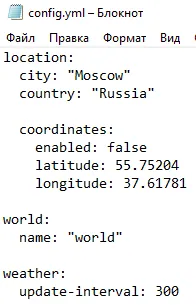
Administrators can define the target real-world location by specifying a city and country or by entering exact geographical coordinates. Using manual latitude and longitude is particularly helpful for rural areas or small villages that do not appear in standard city searches.
The configuration file allows server owners to select which specific Minecraft world receives the weather updates and how often the data refreshes. The update interval is set in seconds, such as checking for new weather every 300 seconds. Changes to the configuration can be applied at any time without restarting the server.
Commands and Permissions
All players can check the current meteorological data and plugin settings using the /atmosync status command. This displays the configured location, location mode, target Minecraft world, current weather condition, and real-world temperature.
Administrative actions are restricted to server operators and include full tab completion support. Operators can use /atmosync update to trigger an immediate asynchronous weather check, or /atmosync reload to refresh the configuration file and restart the synchronization task. Non-operator players will not see these administrative commands in their tab completion suggestions.
How to install
- Stop your Paper/Spigot server.
- Put the .jar file into the
pluginsfolder. - Start the server and edit the config it creates.
Similar
A server plugin that synchronizes Minecraft's day/night cycle with real-world time zones or solar time at real geographic coordinates.

A server plugin that synchronizes in-game time and weather with real-world locations.

A mod that syncs in-game weather, seasons, and time with real-life local weather data and system clock.
A Bedrock addon that synchronizes the Minecraft world time with real-life time and configurable timezones.

A server-side Fabric mod that synchronizes in-game weather with real-world locations via the OpenMeteo API.

A server plugin that synchronizes in-game time and weather with any real-world location and timezone.

A Fabric mod that syncs the in-game daylight cycle and weather to real-world latitude and longitude coordinates.

A server plugin that syncs in-game weather with real-life weather conditions at specified GPS coordinates.