
Boshy's BTE Utils
A Fabric utility mod for the Build the Earth project that visualizes TPLL coordinate points with markers, lines, image overlays, and Google Earth KML imports.
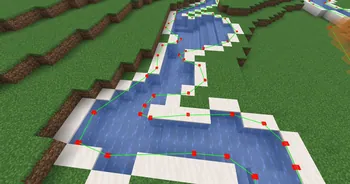
Overview
Boshy's BTE Utils is a Fabric mod designed by BoshyWashy7 to simplify construction within the Build the Earth project. It assists builders by providing visual markers for TPLL points, image overlays, and automated TPLL execution using KML files. The utility is built for Minecraft Java Edition and supports versions 1.21.10, 26.2, and 26.3. To function properly, the mod requires Fabric API, Cloth Config, and Mod Menu to be installed alongside it.
TPLL Keybinds and Marker Management
Players can bind the TPLL function to a custom key in the Minecraft controls menu to quickly teleport using coordinates copied from Google Maps or Google Earth Pro. Once at the desired location, running the `/boshys-bt-utils addMarker` command places a visual marker at the player's current position. Selecting two markers will draw a connecting line between them, and the colors for both markers and lines can be customized in the Mod Menu settings.
Removing markers can be done individually or all at once depending on the builder's needs. To delete a single point, a player with an empty hand can right-click the marker to select it and press the delete key. If all placed points need to be removed simultaneously, executing the `/boshys-bt-utils clearMarkers` command will clear them.
KML Importing and Image Overlays
The mod supports automated marker placement by importing KML files exported from Google Earth. Users can set or view the directory for these files through the KML Importing section of Mod Menu or via the `/boshys-bt-utils markerFileLocation` command. Single or multiple files are loaded using `/boshys-bt-utils importKML` or `/boshys-bt-utils importMultipleKMLs`, during which the player must remain completely still so the TPLL markers do not misalign, while `/boshys-bt-utils stopImport` cancels any active or queued imports.
Image overlays allow builders to project visual guides, such as interior building blueprints, directly into the game world. Standing at a specific spot and entering `/boshys-bt-utils overlay new` generates a new image overlay at that position. Builders can then adjust the scale and shape of the image using `/boshys-bt-utils overlay corner`, or relocate the image's anchor point to their current position with `/boshys-bt-utils overlay moveToPlayer`.
How to install
- Install the loader shown in the table (Fabric, Forge or NeoForge) for the same Minecraft version.
- Put the .jar file into
.minecraft/mods. - Start Minecraft with that loader profile.
Similar
A server plugin that synchronizes Minecraft's day/night cycle with real-world time zones or solar time at real geographic coordinates.
A server plugin that synchronizes in-game time and weather with real-world locations.

A mod that syncs in-game weather, seasons, and time with real-life local weather data and system clock.
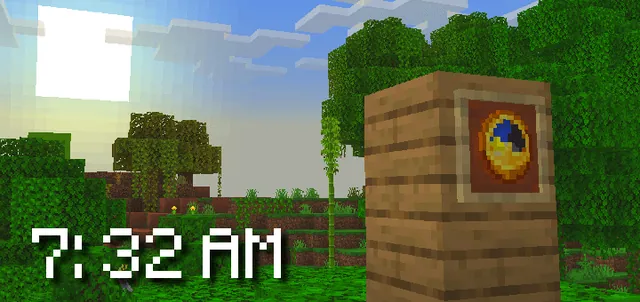
A Bedrock addon that synchronizes the Minecraft world time with real-life time and configurable timezones.

A server-side Fabric mod that synchronizes in-game weather with real-world locations via the OpenMeteo API.

A server plugin that synchronizes in-game time and weather with any real-world location and timezone.

A Fabric mod that syncs the in-game daylight cycle and weather to real-world latitude and longitude coordinates.

A server plugin that syncs in-game weather with real-life weather conditions at specified GPS coordinates.