
RealWorld Sync
A mod that synchronizes Minecraft's day/night cycle with system time and weather with real-world Open-Meteo data.
Overview
RealWorld Sync is a Minecraft mod that connects your in-game environment directly to real-life time and weather patterns. Instead of using the standard accelerated game clock, this tool implements a 24-hour cycle where 1 real-world minute matches 1 minute inside the game. The transitions between daylight and nighttime happen gradually by reading your computer's system clock.
In addition to tracking time, the project adjusts in-game atmospheric conditions to mirror outside meteorological data. It achieves this by pulling live reports through the Open-Meteo API. As a result, if rainfall occurs outside, precipitation will also begin in your virtual world.
Command Restrictions and Interface
To protect immersion and keep players from bypassing the synchronized settings, the mod blocks specific cheats. Specifically, the /time and /weather commands are turned off while the modification is active. This restriction guarantees that the natural progression of day, night, and storms cannot be manually altered.
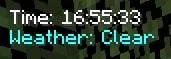
Users can keep track of the active synchronization through a dedicated HUD element on their monitor. Located in the upper-left corner, this live display presents the current time alongside the active weather state. Players who want an unobstructed view can turn this overlay on or off whenever they wish by hitting the H key.
How to install
- Install the loader shown in the table (Fabric, Forge or NeoForge) for the same Minecraft version.
- Put the .jar file into
.minecraft/mods. - Start Minecraft with that loader profile.
Similar
A server plugin that synchronizes Minecraft's day/night cycle with real-world time zones or solar time at real geographic coordinates.

A server plugin that synchronizes in-game time and weather with real-world locations.

A mod that syncs in-game weather, seasons, and time with real-life local weather data and system clock.
A Bedrock addon that synchronizes the Minecraft world time with real-life time and configurable timezones.

A server-side Fabric mod that synchronizes in-game weather with real-world locations via the OpenMeteo API.

A server plugin that synchronizes in-game time and weather with any real-world location and timezone.

A Fabric mod that syncs the in-game daylight cycle and weather to real-world latitude and longitude coordinates.

A server plugin that syncs in-game weather with real-life weather conditions at specified GPS coordinates.